

Cloudflare Pages supports Bun, at least on paper. The Pages build image documentation lists Bun in the supported runtime table, lets you override it with BUN_VERSION, and says the v3 build image defaults to Bun 1.2.15.
That sounds simple until you ask for BUN_VERSION=latest and your deployment fails before your app even gets a chance to embarrass itself.
As of July 6, 2026, the latest Bun release is 1.3.14, while Cloudflare Pages still defaults to Bun 1.2.15. After a few rounds of testing, the most reliable fix I found is to skip Cloudflare's automatic dependency install, install Bun through npm with scripts enabled, and force the build shell to use npm's global binary path before Cloudflare's preinstalled Bun.
#1. What goes wrong with BUN_VERSION=latest
Cloudflare's documented path is to set BUN_VERSION in your Pages project. For the default preinstalled version, that can be fine. For latest or any other specific version, it can fail during Bun installation with a 403 from the installer path:
2026-07-06T01:18:13.088163Z	Installing bun latest
2026-07-06T01:18:13.34936Z	Plugin bun's list-all callback script failed with output:
2026-07-06T01:18:13.351082Z	curl: (22) The requested URL returned error: 403
2026-07-06T01:18:13.353396Z
2026-07-06T01:18:13.365851Z	bun  is already installed
2026-07-06T01:18:13.61882Z	Plugin bun's list-all callback script failed with output:
2026-07-06T01:18:13.619964Z	curl: (22) The requested URL returned error: 403
2026-07-06T01:18:13.622207Z
2026-07-06T01:18:13.63001Z	Error: Exit with error code: 1
2026-07-06T01:18:13.630373Z	    at ChildProcess.<anonymous> (/snapshot/dist/run-build.js)
2026-07-06T01:18:13.630738Z	    at Object.onceWrapper (node:events:652:26)
2026-07-06T01:18:13.630897Z	    at ChildProcess.emit (node:events:537:28)
2026-07-06T01:18:13.63146Z	    at ChildProcess._handle.onexit (node:internal/child_process:291:12)
2026-07-06T01:18:13.638586Z	Failed: build command exited with code: 1
2026-07-06T01:18:14.841415Z	Failed: error occurred while running build command
This is not a brand-new paper cut. Related reports have been around for years, including oven-sh/setup-bun#70 and oven-sh/bun#6305. The short version: the install flow can trip over a remote download or rate limit problem, and Cloudflare Pages treats that as a failed build. Fair enough, but not very helpful when all you wanted was bun install. The funny part is that this is not Cloudflare rate-limiting Bun. It is Bun's own download side saying no, while bun.sh and bun.com currently return server: cloudflare. Infrastructure irony, served with a 403.
I also checked the current installer script. On Linux, it is refreshingly boring: detect the platform and CPU, pick a target such as linux-x64, linux-x64-baseline, linux-aarch64, or a musl build for Alpine, then download https://github.com/oven-sh/bun/releases/latest/download/bun-$target.zip, unzip it into $BUN_INSTALL/bin or ~/.bun/bin, and mark the binary executable. If bun is not already on PATH, it writes the usual BUN_INSTALL and PATH lines into the user's shell config when it can, or prints the commands to add manually. There is no package index, dependency solver, or anything especially magical here. It is mostly a small shell script pointing at GitHub Release assets, which makes the rate limit feel even stranger.
#2. Why npm install -g bun alone is not enough
There is a common workaround: skip automatic dependency installation and run Bun yourself. For example, dt.in.th documented this pattern:
npm install -g bun && bun install && bun run build
That gets close, but in my Cloudflare Pages tests it still used Cloudflare's older preinstalled Bun. The build log told on it:
2026-07-06T19:40:16.361085Z	Executing user command: npm install -g bun && bun install && bun run build
2026-07-06T19:40:33.293457Z
2026-07-06T19:40:33.30093Z	added 5 packages in 16s
2026-07-06T19:40:33.301321Z	npm warn allow-scripts 1 package has install scripts not yet covered by allowScripts:
2026-07-06T19:40:33.301456Z	npm warn allow-scripts   bun@1.3.14 (postinstall: node install.js)
2026-07-06T19:40:33.301535Z	npm warn allow-scripts
2026-07-06T19:40:33.301612Z	npm warn allow-scripts Run `npm approve-scripts --allow-scripts-pending` to review, or `npm approve-scripts <pkg>` to allow.
2026-07-06T19:40:33.966013Z	Reshimming asdf nodejs...
2026-07-06T19:40:43.03495Z	bun install v1.2.15 (df017990)
Two things happened there:
- npm installed the
bunpackage, but its install script needed to be allowed. - The shell still resolved
bunto Cloudflare's preinstalled/asdf-shimmed Bun before the npm-installed binary.
The result is the worst kind of failure: it looks like you installed the new Bun, then the build quietly uses the old one. Very considerate. Also very wrong.
#3. The working Cloudflare Pages setup
First, disable automatic dependency installation so Cloudflare Pages does not run its own package manager step before your command.
In the Cloudflare Dashboard:
- Go to Build > Compute > Workers & Pages
- Open your Pages project
- Go to Settings > Variables and secrets
- Add this build variable:
Type: Text
Variable name:
SKIP_DEPENDENCY_INSTALL
Value:
true
or
1
Cloudflare documents this variable in its build image guide: it disables automatic dependency installation so you can run a custom install command.
Then set your Pages build command to this:
npm install -g --allow-scripts=bun bun && export PATH="$(npm prefix -g)/bin:$PATH" && bun --version && bun install && bun run build
Screenshot:
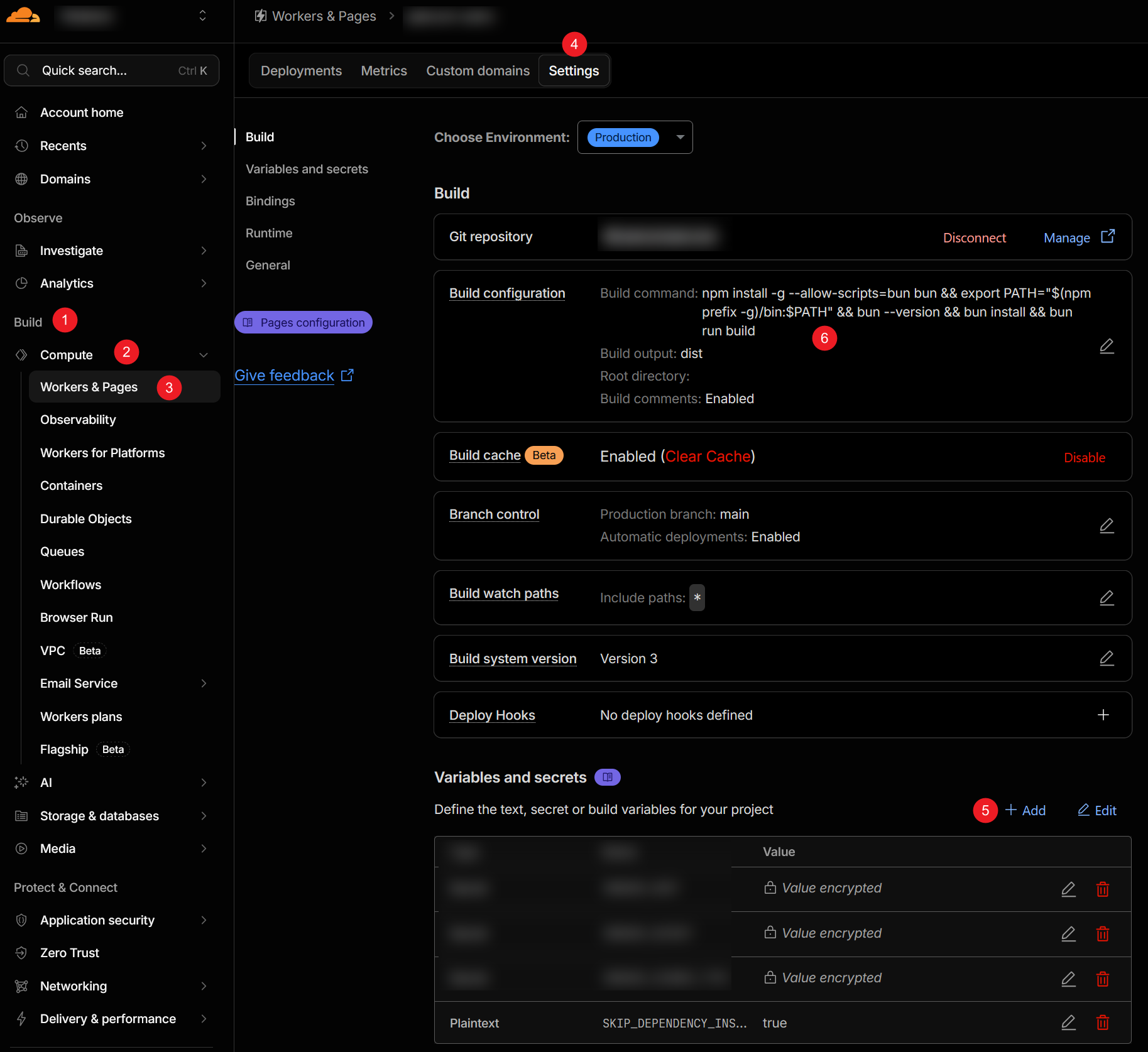
Here is what each part does:
-
npm install -g --allow-scripts=bun bunInstalls Bun from npm and allows Bun's install script to run. Without that script, you can end up with the wrapper package but not the native Bun binary you actually need.
-
export PATH="$(npm prefix -g)/bin:$PATH"Puts npm's global binary directory at the front of
PATH. This is the important bit. It makes the nextbuncommand resolve to the npm-installed Bun instead of Cloudflare's default Bun1.2.15. -
bun --versionPrints the Bun version in the build log. This is not decoration. It is the smoke alarm. If this does not print the version you expect, stop reading the rest of the log like it owes you money and fix the PATH first.
-
bun install && bun run buildInstalls dependencies and runs your normal build with the Bun binary you just verified.
#4. What a good build log looks like
With the command above, the build finally used Bun 1.3.14:
2026-07-06T19:57:20.330572Z	SKIP_DEPENDENCY_INSTALL is present in environment. Skipping automatic dependency installation.
2026-07-06T19:57:20.330827Z	Executing user command: npm install -g --allow-scripts=bun bun && export PATH="$(npm prefix -g)/bin:$PATH" && bun --version && bun install && bun run build
2026-07-06T19:57:26.270869Z	added 5 packages in 5s
2026-07-06T19:57:26.853104Z	Reshimming asdf nodejs...
2026-07-06T19:57:29.865184Z	1.3.14
2026-07-06T19:57:29.870732Z	bun install v1.3.14 (0d9b296a)
2026-07-06T19:58:07.304997Z	Success! Uploaded 38 files (2604 already uploaded) (1.85 sec)
2026-07-06T19:58:12.958621Z	Success: Assets published!
2026-07-06T19:58:13.849805Z	Success: Your site was deployed!
The key lines are:
1.3.14
bun install v1.3.14 (0d9b296a)
That proves both bun --version and bun install are using the same current Bun binary.
#5. Should you use latest or pin a version?
For a personal site or a small project, installing the latest Bun during the Pages build may be convenient. You get current fixes without editing the Cloudflare project every time Bun ships.
For production builds where repeatability matters, pin the npm package instead:
npm install -g --allow-scripts=bun [email protected] && export PATH="$(npm prefix -g)/bin:$PATH" && bun --version && bun install && bun run build
That keeps the same PATH fix, but removes surprise upgrades from the equation. Surprise upgrades are fun in exactly one place: other people's staging environments.
#6. Final checklist
Use this setup when you want Cloudflare Pages to build with the current Bun instead of the preinstalled default:
-
Add
SKIP_DEPENDENCY_INSTALL=truein Pages variables and secrets. -
Use this build command:
npm install -g --allow-scripts=bun bun && export PATH="$(npm prefix -g)/bin:$PATH" && bun --version && bun install && bun run build -
Check the build log for the expected version after
bun --version. -
Check that
bun installreports the same version.
If Bun or Cloudflare fixes the issue later, this workaround can become shorter. Bun can fix the rate limit behavior on its own download side. Cloudflare can also avoid Bun's installer script for a managed build runtime and fetch the versioned or latest GitHub Release asset directly. Neither option requires a new theory of computing. Until then, the build command above gives you the latest Bun without asking Cloudflare's preinstalled runtime to kindly stop standing in the doorway.