

Flagium - Instantly See Where Any Website Is Hosted
Flagium is a Chrome extension that instantly shows any website’s server location, IP, ASN, and hosting details for fast CDN and network diagnostics.

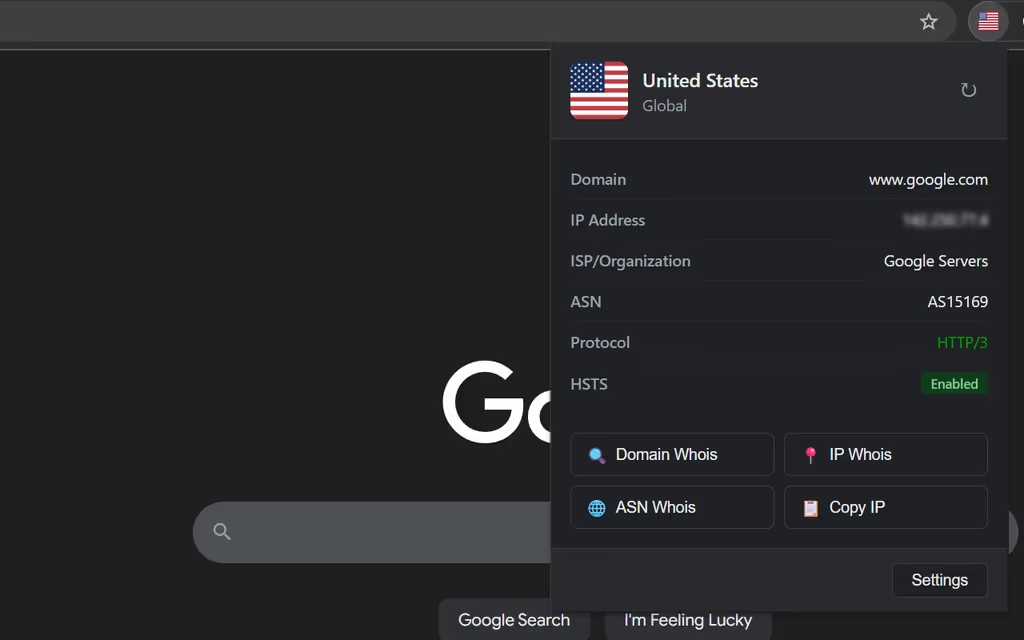
🚩 Flagium — Instantly See Where Any Website Is Hosted
As web developers and site administrators, we constantly need quick visibility into where our websites are actually being served from.
Whether you're debugging CDN routing, verifying geo-rules, or simply curious about the infrastructure behind a site, Flagium is the Chrome extension that puts this information right at your fingertips.
🔍 What Is Flagium?
Flagium is a lightweight, privacy-focused Chrome extension that instantly displays server location and network details for any website you visit.
A glance at the toolbar shows the country flag of the server you're connected to — and one click reveals deeper infrastructure information.
🚀 Key Features
1. Instant Visual Feedback
The extension icon automatically updates to show the server’s country flag — no clicks required.
Know immediately whether you're hitting your US origin server, a European CDN edge node, or an unexpected location indicating routing issues.
2. In-Depth Server Information
Click the icon to view real-time backend details, including:
- IP Address
- Geographic Location (country / city / region)
- ISP & Organization
- ASN (Autonomous System Number)
- Protocol Version (HTTP/1.1, HTTP/2, HTTP/3)
- HSTS Status
3. One-Click WHOIS Lookups
Quick-access lookup buttons for:
- Domain WHOIS
- IP WHOIS
- ASN WHOIS
4. Custom Power-User Actions
Add custom tool integrations using URL templates, such as:
https://rdap.ss/whois/{domain}https://rdap.ss/whois/{asn}https://bgp.tools/prefix/{ip}https://bgp.he.net/{asn}
5. Smart Local Caching
Flagium caches lookup results (configurable: 1 minute → 24 hours) to minimize API calls while keeping information fresh.
All cached data remains 100% local in your browser.
🔧 Real-World Use Cases
CDN Verification
Confirm which edge region is serving your content.
Use VPN to compare routing across multiple regions.
Debugging Geo-Routing
Identify where requests are actually landing to troubleshoot DNS issues, CDN misconfigurations, or origin failover.
Security & Threat Research
Expose hosting infrastructure, ISP, and ASN instantly.
Combine with custom actions for Shodan, VirusTotal, etc.
Competitive / Infra Analysis
See which CDN or hosting provider any website uses — instantly.
Tracking Protocol Adoption
Monitor HTTP/2 & HTTP/3 usage across the web and verify your own deployments.
🔐 Privacy-First Design
Flagium was built with privacy as a core philosophy:
- ❌ No tracking / no analytics
- ❌ No data collection
- ❌ No external storage — cache never leaves your browser
- ➕ Minimal API usage — only when geolocation is needed
Privacy policy:
https://m.ac/privacy-policy-for-flagium/
🌍 Multi-Language Support
Flagium currently supports:
- English
- Simplified Chinese
- Traditional Chinese
- Japanese
- Many more
The extension auto-detects your browser language.
🚀 Getting Started
- Install Flagium from the Chrome Web Store
- Visit any website
- See the server’s country flag on the toolbar
- Click for complete server infrastructure details
No configuration required — it works immediately.
Advanced users can customize caching duration, language, and custom action buttons in the Options page.
💙 Free & Open Source
Flagium is open source and completely free to use:
- No API keys
- No subscriptions
- No hidden features
A simple, fast, privacy-respecting tool for people who build and maintain the web.
📌 Install Flagium on Chrome Web Store:
Compatible with Chrome, Microsoft Edge, Brave, Vivaldi, Arc, and all Chromium-based browsers.